Note September 2026: Support for importing Summary of Findings (SoF) tables from RevMan Web is a new feature. RevMan Web's dynamic Summary of Findings table functionality continues to evolve, and the integration with MAGICapp is also being refined. We welcome feedback on your experience with the import process. If you encounter any issues or have suggestions for improvement, please contact us at support@magicevidence.org.
MAGICapp integrates directly with RevMan Web, enabling you to import Summary of Findings (SoF) tables from reviews and use them to create PICOs in MAGICapp. This is the recommended approach for most users, and all actively maintained reviews should be managed in RevMan Web.
MAGICapp also supports importing RevMan 5 (.rm5) files. However, as RevMan 5 has been superseded by RevMan Web, this option is primarily intended for older legacy reviews.
Export SoF table from RevMan
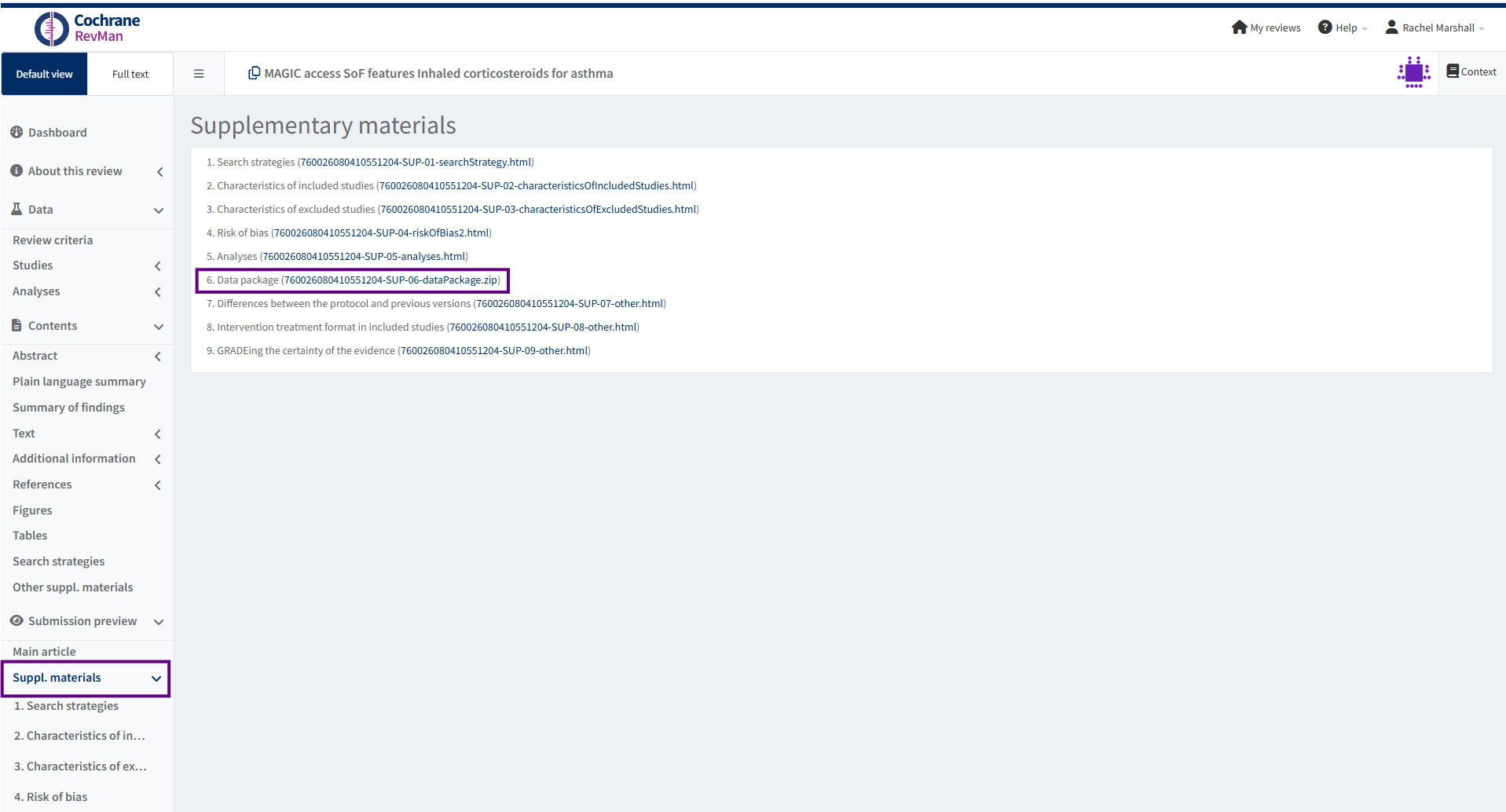
In RevMan Web, under Suppl. materials in the left-hand menu, select Data package. This will download a ZIP file containing your review data.
Note: Users working with legacy RevMan 5 (.rm5) files can import these directly into MAGICapp.
Upload RevMan SoF table to MAGICapp as a PICO
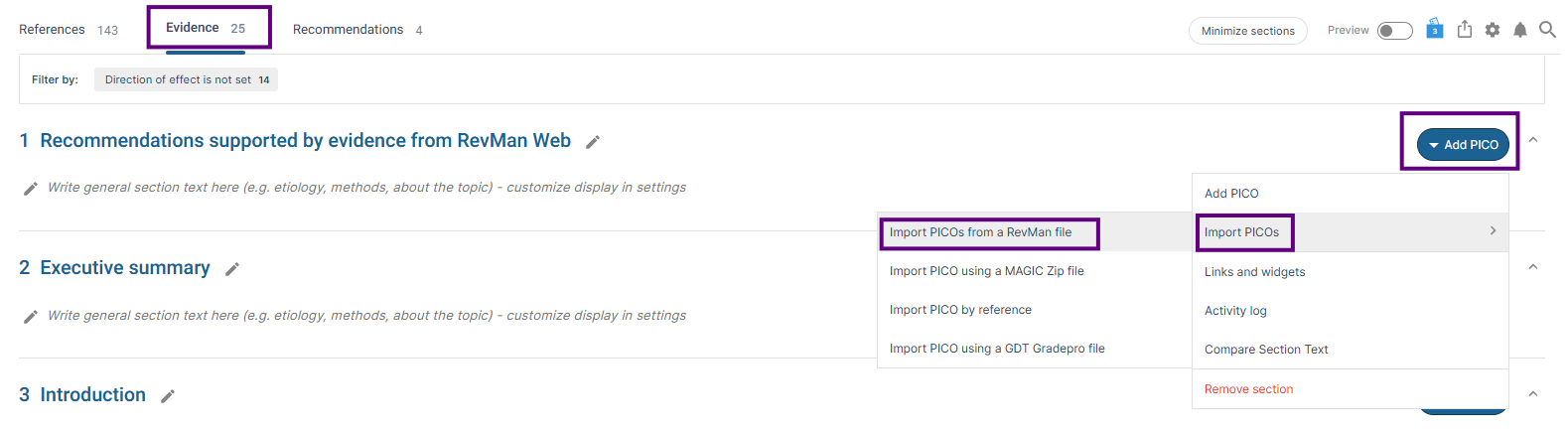
In MAGICapp, navigate to the guideline where you would like to create the PICO. Open the section where the PICO should be added, or create a new section if required. Select Add PICO, then choose Import PICOs from a RevMan file.
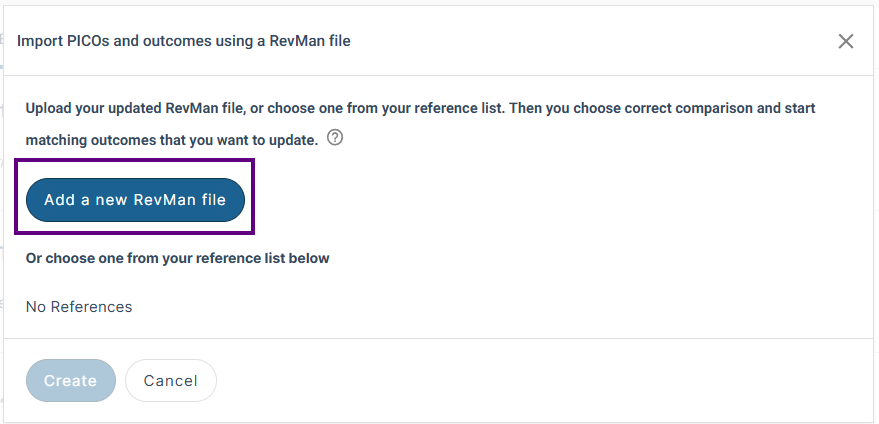
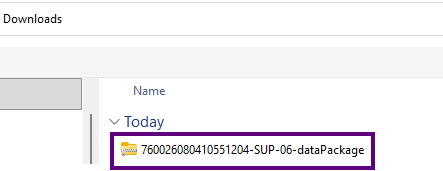
A pop-up window entitled Import PICOs and outcomes using a RevMan file will appear. Click Add a new RevMan file, then select the RevMan Web ZIP file downloaded in the previous step.
Select the Comparison(s) and Outcome(s) to import
Select the Comparison(s) and Outcome(s) to import, then click Create. After the import is complete, refresh the page to display the imported SoF tables as PICOs in MAGICapp.
Note: The RevMan Web data package contains the structured review data available for export from RevMan Web. However, not all SoF tables in a review may be available for import into MAGICapp. Only SoF tables created using RevMan Web's built-in SoF table functionality (sometimes referred to as dynamic Summary of Findings tables) are included in the data package and available for import into MAGICapp.
The following table types are not included in the structured data export and therefore cannot be imported:
- SoF tables managed through the GRADEpro integration
- Free-text SoF tables created manually in RevMan Web
Note: MAGICapp orders outcomes by type (dichotomous, continuous and non poolable), so the order of outcomes in your PICO in MAGICapp may not be the same as the SoF table in RevMan.
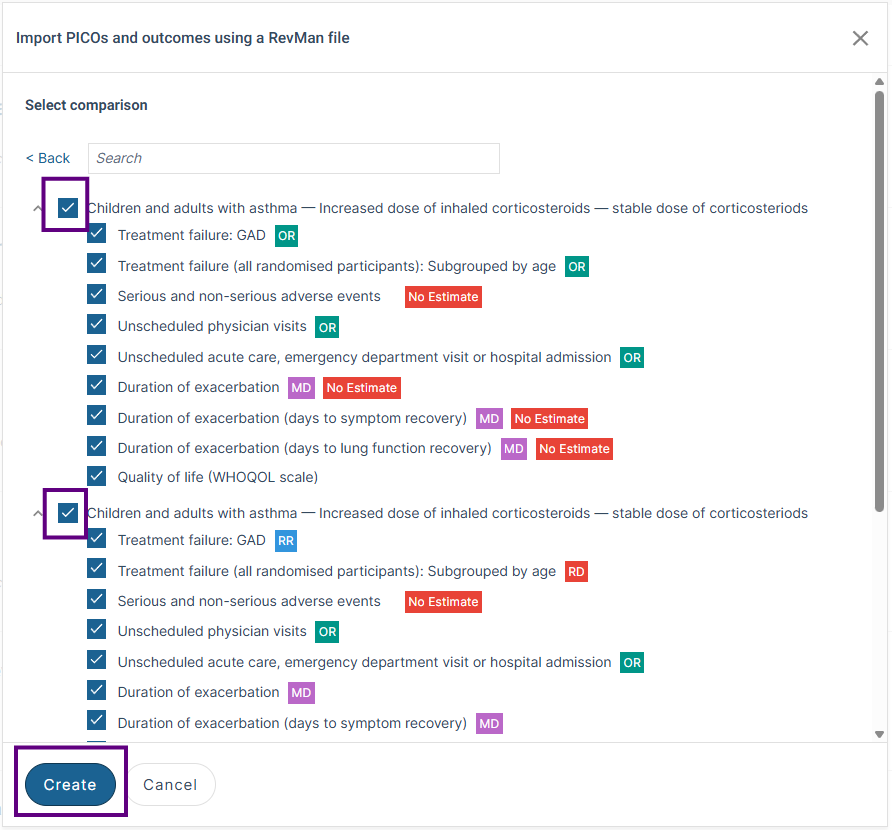
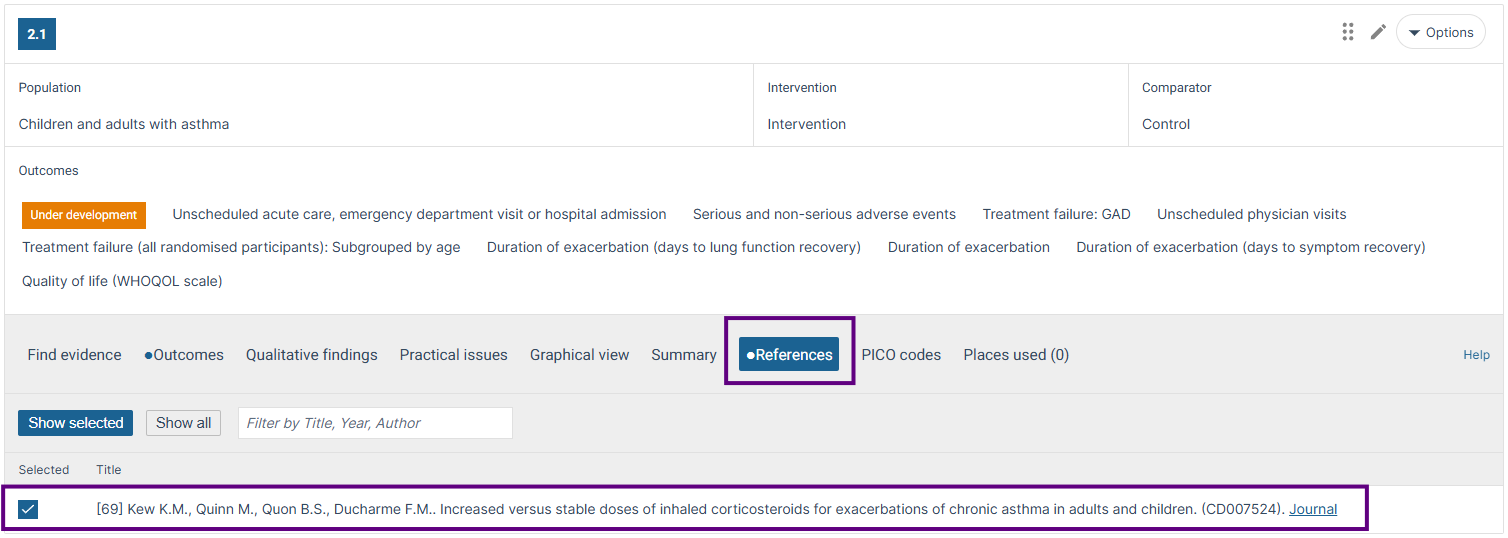
When you upload a RevMan Web data package (.zip) or a RevMan 5 (.rm5) file, a reference will automatically be added to the reference list and cited within the PICO. The citation can be unselected in the PICO if required.
Note: For unpublished reviews, guideline authors should review and amend the reference as required to reflect the unpublished status of the data.

Upload a RevMan Web data package (.zip) or RevMan 5 (.rm5) file as a reference
Alternatively, you can first upload a RevMan Web data package (.zip) or RevMan 5 (.rm5) file as a reference, and then select the Comparison(s) and Outcome(s) you would like to include in your PICO.
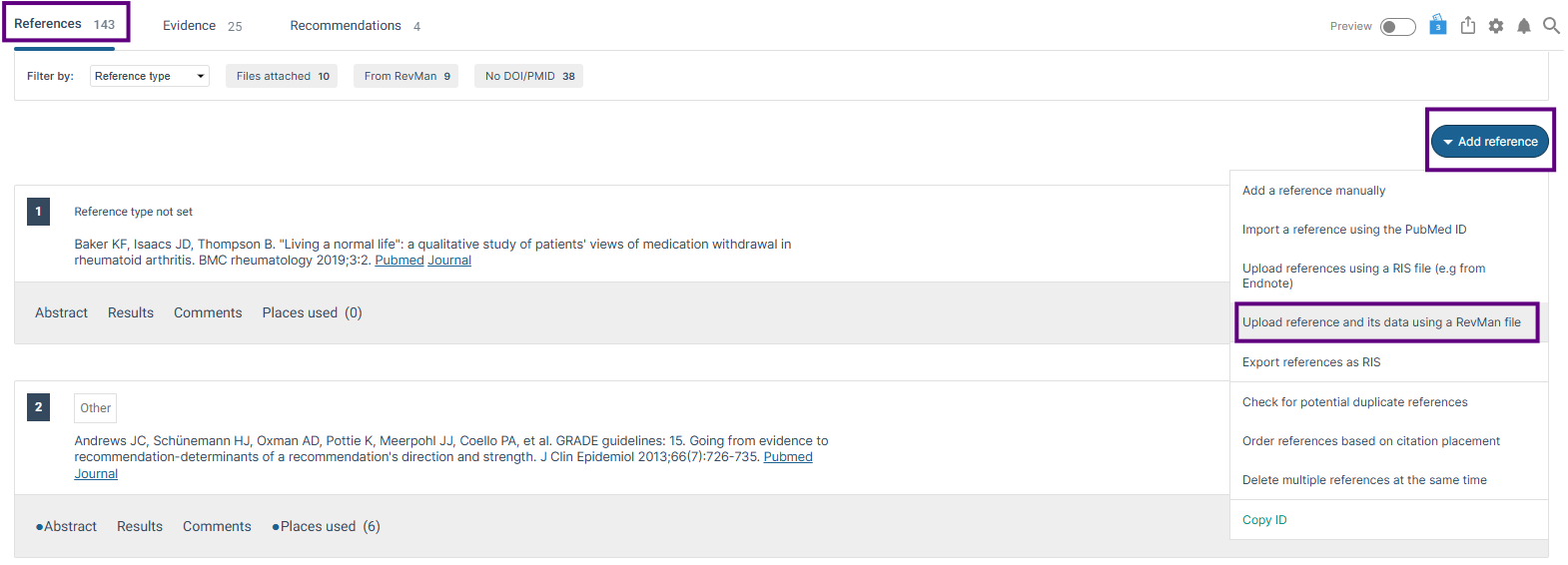
In the References tab, select Add reference and then Upload reference and its data using a RevMan file.
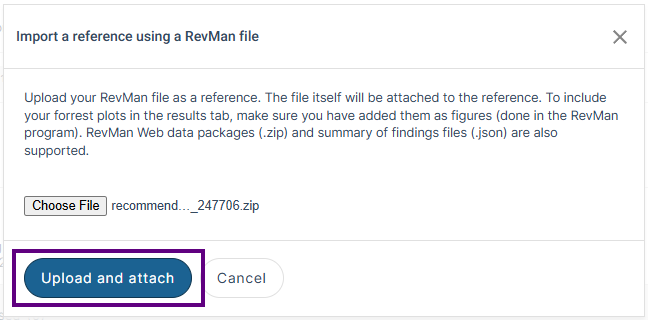
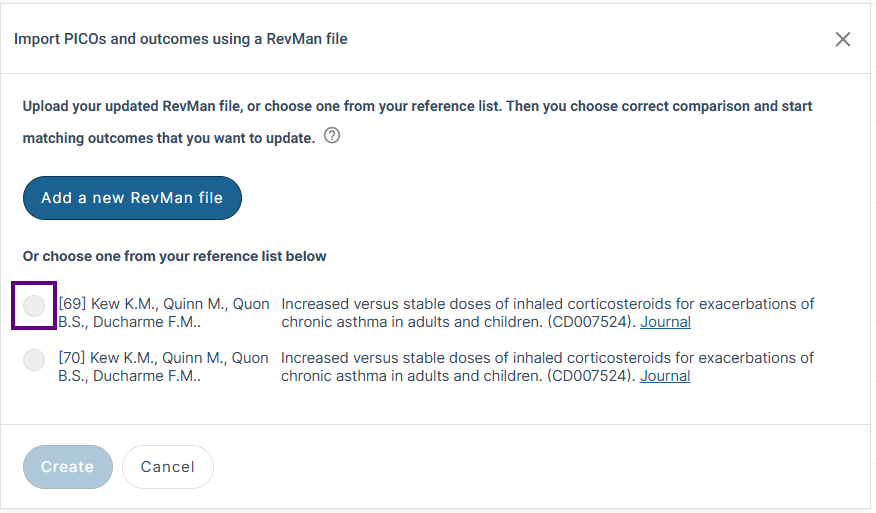
Next, go to Import PICOs from a RevMan file (as described above). In the Import PICOs and outcomes using a RevMan file window, select the uploaded RevMan reference. You will then be shown the Select comparisons and outcomes screen, where you can choose the comparisons and outcomes to include in your PICO.
Data in MAGICapp from RevMan
MAGICapp extracts the following study data:
- Outcome name and timeframe.
- Effect estimates and 95% CIs.
- Number of participants and studies.
- Individual study data (currently .rm5 files only).
- Absolute effect estimates.
- GRADE certainty of the evidence and footnotes (RevMan Web data package (.zip) only).

Note: Individual study data currently only available in .rm5 files

See also other help articles including:
How do I attach study data to my outcome?
How do I add or remove a figure associated with a PICO?
Update PICOs using shadow outcomes
Last updated: 29 September 2026
Was this article helpful?
That’s Great!
Thank you for your feedback
Sorry! We couldn't be helpful
Thank you for your feedback
Feedback sent
We appreciate your effort and will try to fix the article