MAGICapp integrates directly with GRADEpro, allowing you to import Summary of Findings (SoF) tables and use them to create PICOs in MAGICapp.
Export SoF table GRADEpro GDT JSON file
In GRADEpro, export your SoF table using the export feature on the top right of the table. GDT can be set to any format of the table (Summary of Findings table, GRADE evidence profile, etc.).

Choose your outcomes (note: you can choose more than 7, you will just receive a warning first), select JSON-LD format, and download the file.

Upload GRADEpro SoF table to MAGICapp as a PICO
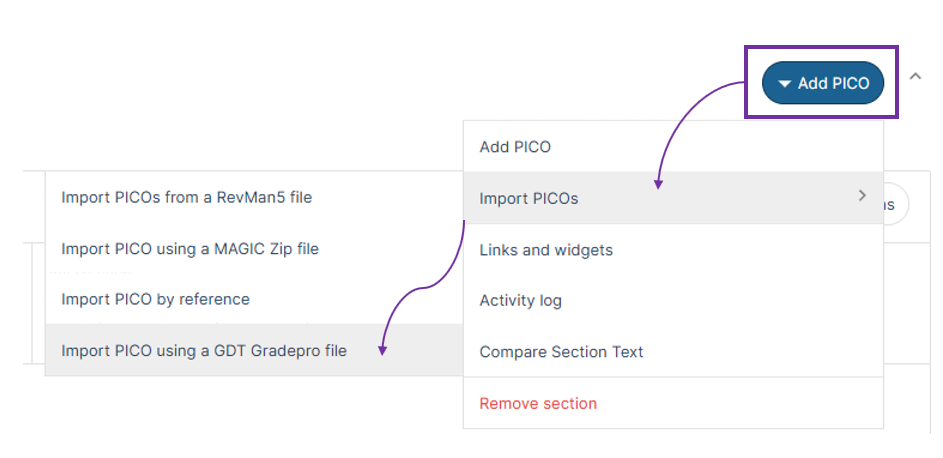
In MAGICapp, go to the Guideline where you would like to create the PICO. Choose or make the section you will place it in. Click Add PICO, and choose Import PICO using GDT Gradepro file. The PICO will now be imported.
 Notes:
- MAGICapp orders outcomes by type (dichotomous, continuous and non poolable), so the order of outcomes in your PICO in MAGICapp may not be the same as the SoF table in GRADEpro.
- MAGICapp does not have diagnostic accuracy test PICOs (in development), thus those cannot be imported.
Last updated: 1 September 2026
Was this article helpful?
That’s Great!
Thank you for your feedback
Sorry! We couldn't be helpful
Thank you for your feedback
Feedback sent
We appreciate your effort and will try to fix the article