About this article
This article is intended for technical teams responsible for integrating external systems with MAGICapp.
The MAGICapp API provides direct access to guideline content and related data, allowing organizations to build custom integrations, applications, websites, and workflows. This article describes how to obtain and use API access, including API user accounts, authentication, permissions, and access to non-public content.
Looking for general information about sharing MAGICapp content?
See:
Looking to integrate MAGICapp content using embeddable web components?
If you want to display MAGICapp content on a website using MAGICapp's supported web components, see: Embeddable widgets for website integration (technical documentation). That article provides an overview of the available widgets, including recommendation widgets, PICO widgets, authentication components, and API access components for website integrations.
API technical documentation
Our API technical documentation can be found here: https://api.magicapp.org/swagger-ui/index.html
Public content
Unauthenticated API users can only access publicly available content.
Non-public content
If you need to access your organization’s non-public content through the API, your organization needs to make a request for an API User Account.
Non-public content is content that customers have created in MAGICapp that has not been set to be public content, e.g.:
- Drafts of guidelines - these are never public
- Published guidelines not set to be public, which means they are only visible to users who are specifically given access permissions.
API access to non-public content is restricted to use by the API User Account for that organization. For more information see: API: Enabling internal access to non-public guidelines (technical documentation)
The permissions model
To protect customer data, you will need an API User Account to access non-public content. Currently, we allow each customer organization to have one API User Account for each of our environments (test environment and production environment). Details on obtaining an API User Account can be found below.
Once your organization has an API User Account, you will need to grant the API User Account access to the guideline content you want to access through the API.
The API User Account will not be able to access any content by default.
The same permissions model applies to both regular user accounts and API user accounts, so access is granted in the same location as How do I add users (admins, authors, reviewers, viewers) to a guideline? Navigate to the permissions area for the guideline in question, but instead of selecting a user’s name you select the check box for Allow the API User Access. If you uncheck the box, you remove access.
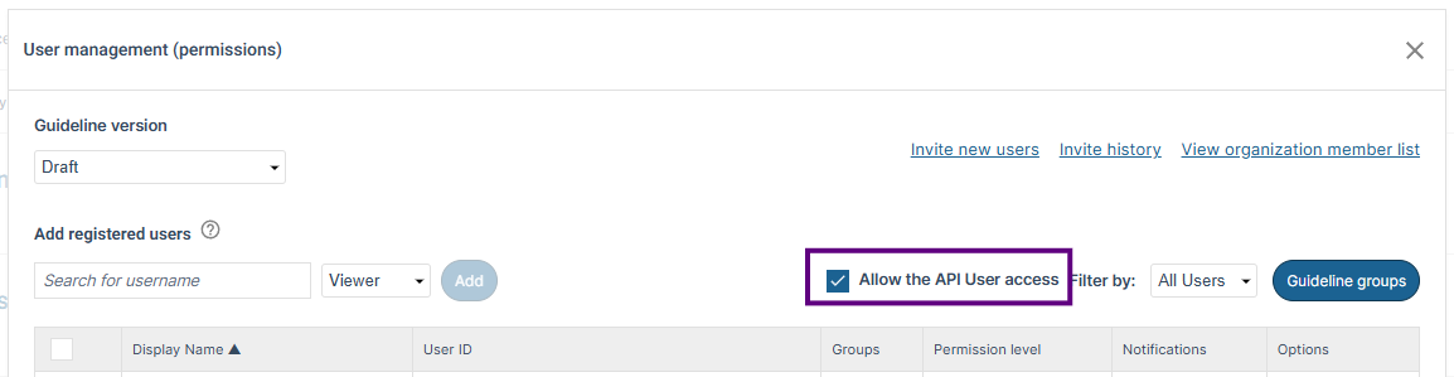
By default, the API User Account is set to have the permission level of author. This allows read and write permissions. You can change the permission level using the drop down, e.g. if you want it to be read only, change it to “reviewer”.
Please think carefully about these permissions. If you give the API User Account author permission level then it is able to edit your content and, similarly, if you give the API User Account admin access, it will be able to change permissions, customizations and other administrative features of the guideline.
You must set up in the MAGICapp test environment first
We have two environments for MAGICapp, a test environment and a production environment. The user permissions for the different environments are completely separate, so you cannot use credentials from one environment to access the other.
We require customers using API User Accounts to do development and testing in the test environment first, before we share credentials for the production environment API User Account. This allows us to verify that the use case will not have an adverse impact on our production environment, which is essential for safeguarding customer data and quality of service to all customers.
Obtaining and using an API User Account for your organization
Please complete this form to request an API User Account for your organization: API User Account Request Form.
API users are designed to be used from server-side services. Do not use your API User Account in a web app or page as you will expose your credentials, and anybody could take them and use them to access / edit your data.
Authenticating to our identity provider
You need to authenticate to our identity provider (idAM) to get a bearer token using your credentials.
curl --location 'https://auth-test.magicapp.org/realms/magicapp/protocol/openid-connect/token' \
         --header 'Content-Type: application/x-www-form-urlencoded' \
         --data-urlencode 'client_id=api-users' \
         --data-urlencode 'username=\<username\>' \
         --data-urlencode 'password=\<password\>' \
--data-urlencode 'grant_type=password'- This example is for our test environment. The hostname should be api.magicapp.org for the production environment.
- Tokens have a short life span of 24 hours.
Pass your Bearer token in Authorization header.
curl --location 'http://localhost:8080/api/v1/guidelines'
         --header 'Authorization: Bearer \<token\>'
Note
- No formatting comes through the API. This means you need to set custom table styles like cell borders with css.
Terms and conditions for accessing MAGICapp content through API services
- Using the API: You're welcome to use our API as long as you follow the rules. Keep things legal, ethical, and respectful. No bad stuff!
- Access to our API services is strictly for non-commercial purposes unless you have a MAGICapp API User Licence Agreement.
- Security: If we provide you with credentials, keep them safe! Don't share them with others.
- Fair Usage: Please use our API responsibly. We do not set specific rate limits, we just ask that you are sensible and don’t overload it, so everyone gets a smooth experience.
- Changes & Updates: We might update or modify the API from time to time. We'll try to keep you in the loop!
- No Guarantees: We do our best, but we can't promise the API will always be perfect.
- Play Nice: If you misuse the API, intentionally or unintentionally, we might have to block your access.
- By using the MAGICapp API, you agree to these terms. Have fun building!
If you have any queries about our API, please contact support@magicevidence.org
Last updated: 17 November 2026
Was this article helpful?
That’s Great!
Thank you for your feedback
Sorry! We couldn't be helpful
Thank you for your feedback
Feedback sent
We appreciate your effort and will try to fix the article